LinkedIn Video Content Strategy for Founders 2026: The Complete Playbook
Video on LinkedIn is no longer optional. In 2026, video content generates 5 times more engagement than text-only posts, and founders who publish video consistently see dramatically higher reach, profile views, and inbound opportunities than those who stick to written content alone.
But here's the catch: most founders don't start with video because they think it requires professional equipment, a video crew, or Hollywood-level production. None of that is true. The best-performing founder content on LinkedIn is shot on iPhones, recorded in home offices, and edited in simple tools like CapCut or Descript.
This guide walks you through why video matters, what kinds of video work best for founders, how to actually produce videos on a realistic timeline, and how to integrate video into a larger content strategy. By the end, you'll have a concrete system for creating, producing, and publishing founder video content that drives engagement and opportunities.
Table of Contents
- Why Video is Now the Primary Format on LinkedIn
- The Five Types of Video Founders Should Create
- Equipment and Setup: What You Actually Need
- The Video Production Workflow
- Building Your Video Content Calendar
- Metrics That Matter: What to Track
- Scaling: From One Video Per Month to Weekly
- Frequently Asked Questions
Why Video is Now the Primary Format on LinkedIn {#why-video-matters}
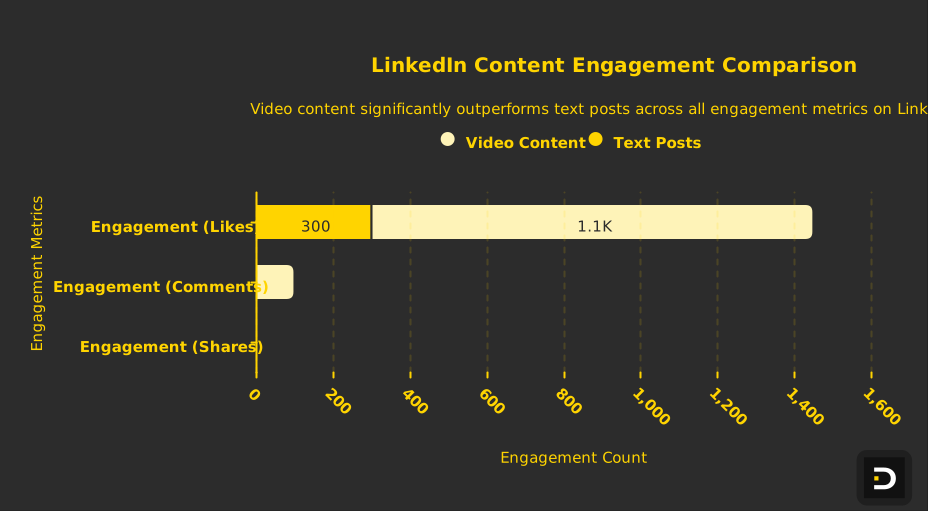
LinkedIn's algorithm has shifted decisively toward video. In 2024, LinkedIn announced that video content received 5 times more engagement than text posts. By 2025, video was the fastest-growing content format on the platform, and that trend has only accelerated heading into 2026.
The engagement difference is striking. A text post from a founder with 50,000 followers might get 200–400 likes. The same founder posting a 60-second video on the same topic often gets 800–1,500 likes, 50–150 comments, and significantly more shares. The algorithmic boost is real and measurable.
But engagement isn't the only reason video matters. Video humanizes you. When someone reads your text post, they understand your ideas. When they watch a video of you speaking, they understand you as a person—your communication style, your energy, your credibility. This human element is what drives relationship-building on LinkedIn.
For founders specifically, video serves several business purposes. It establishes credibility in your domain. A founder who speaks clearly and confidently about industry trends in a video is more trustworthy than one who just posts links to articles. It builds narrative continuity. Video allows you to tell more complex stories—about why you started your company, how you're thinking about the market, what you're seeing in customer conversations. It drives real conversations. Prospects, investors, and potential hires watch your videos and then reach out with real business discussions. It's both educational and relationship-building in a way text rarely achieves.
The Five Types of Video Founders Should Create {#video-types}
Not all founder videos are created equal. Different formats serve different purposes and perform differently depending on your audience and goals. Understanding these five types will help you plan a balanced video content calendar.
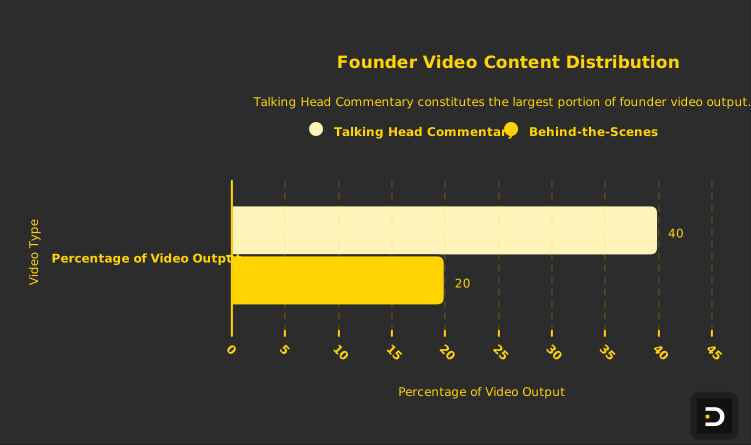
Type 1: Talking Head Commentary (40% of your video output)
A talking head video is you speaking directly to the camera, usually about an industry trend, a market observation, or a lesson you've learned. The format is simple: you, camera, background. Length: 60–90 seconds. These videos perform exceptionally well because they're authentic, they establish authority, and they're easy to produce.
Talk head videos work because they create the illusion of a direct conversation. When prospects or investors watch a 90-second video of you explaining why you believe AI is overvalued in cybersecurity, or why you're bullish on infrastructure-as-code, they feel like they've had a real conversation with you. They've heard your reasoning. They understand how you think.
The best talking head videos follow a simple structure: hook (5–10 seconds on the surprising claim or question), explanation (40–60 seconds developing the idea with one or two specific examples), close (10–15 seconds with a call to action or open question). Most should be 60–120 seconds—long enough to develop an idea, short enough to retain attention.
Type 2: Behind-the-Scenes and Company Culture (20%)
Behind-the-scenes videos show your audience the human side of your company. These might include office tours, team interactions, day-in-the-life content, or team celebrations. The appeal is genuine: people connect with people, not logos.
Behind-the-scenes videos are less about impressive production and more about authenticity. They're often shot handheld on an iPhone, with natural sound, in real moments. When people see that you're hiring (you film your team in the office doing real work), they imagine themselves there. When they see how your team celebrates wins, they get a sense of your culture. This content is invaluable for recruiting and building brand affinity.
These videos usually run 30–60 seconds and should be published maybe 2–4 times per month. They don't drive tons of engagement on their own, but they support narrative continuity and build your brand beyond "thought leader."
Type 3: Whiteboard/Screen Share Explanation (20%)
These are videos where you explain a concept using a whiteboard, screen share, or animated explanation. You might walk through your product, explain a market trend, or break down a complex industry dynamic that's easier to understand with visuals.
Screen share and whiteboard videos are highly valuable for thought leadership because they demonstrate expert thinking. When you're on a screen share explaining why the traditional enterprise sales model is breaking down for mid-market software, you're not just stating an opinion—you're showing your analytical framework. This is persuasive and educational simultaneously.
These videos require slightly more production effort than talking head (you need to record your screen or film yourself at a whiteboard), but they're worth it. Publish these 1–2 times per month.
Type 4: Customer Stories and Testimonials (10%)
Video testimonials from customers are exceptionally powerful. A customer speaking on camera about the problem they had, how your solution helped, and the results they achieved is more credible than any marketing copy you could write.
You don't need professionally produced testimonial videos. A phone call with a customer where they give you 2–3 minutes of commentary on camera (sometimes over Zoom, which you record and edit) is sufficient. Publish customer video testimonials maybe once per month, and they become some of your highest-engagement content.
Type 5: News Reactions and Market Commentary (10%)
When news breaks in your industry—a new regulation, a competitor's funding round, a market shift—video commentary on that news gets disproportionate engagement. Record a quick 90-second take on what just happened and why it matters, and publish within hours of the news.
These are typically lower-production, in-the-moment content. They don't need heavy editing. They perform well because they're timely and they position you as someone who's constantly thinking about the market.
Equipment and Setup: What You Actually Need {#equipment-setup}
This is the section where most founders get intimidated. They imagine professional filmmaking equipment, studios, lighting rigs. The reality is much simpler.
Minimum viable setup (total cost: $0–$200):
Your iPhone is your camera. iPhones (especially the latest generation) have exceptional video recording capability. Better than you probably realize. You don't need a separate camera.
A quiet room is your studio. An office, home office, or conference room works. Avoid kitchens and bathrooms (too much ambient noise and echo). Ideally choose a room where the background is somewhat professional or interesting—not a blank white wall, but not chaotic either. If your background is boring, hang something simple behind you: a bookshelf, a plant, or a simple piece of art.
Natural light is your lighting. Sit facing a window during daytime. This gives you soft, natural light that's flattering and looks professional. Never record with the window behind you (you'll be backlit and appear dark). If you record in the evening or in poor light, a $30–50 ring light solves the problem.
A basic lavalier microphone ($30–80) improves audio quality dramatically. Your iPhone's built-in microphone picks up all ambient noise. A lavalier mic clipped to your shirt captures your voice clearly. If you're on a Zoom call recording audio, this isn't necessary—the Zoom mic is fine. But for direct-to-camera recording, a lav mic is worth the investment.
Optional upgrades ($200–$500): A simple tripod ($20–40) prevents shaky video (though some shaking is actually okay—it feels authentic). CapCut is free editing software that's surprisingly powerful. If you want professional editing, tools like Adobe Premiere (part of Creative Cloud, $60/month) or Final Cut Pro (one-time $300) are options. Descript ($24/month) is exceptional for scripted content—it automatically transcribes your video and lets you edit by editing the transcript (it then re-edits the video to match).
The actual recording setup:
Position your phone on a tripod at eye level, about 2–3 feet away. The most common mistake is holding the phone too close. Phone cameras have a wide field of view, so 2–3 feet is closer than it feels.
Open the Notes app on your phone and write a loose script. You don't need every word scripted, but write down your three main points. Recording with a script visible just off-camera (propped next to your phone) is fine. Reading directly from script sounds stiff, but glancing at notes every 10–15 seconds is natural and helps you stay on track.
Hit record. Speak naturally—imagine you're explaining this idea to a smart friend, not presenting to an audience. Aim for 90–120 seconds for a talking head video. Most people record multiple takes. Three or four takes is normal. Don't obsess—your second or third take is often better because you're more relaxed.
The Video Production Workflow {#production-workflow}
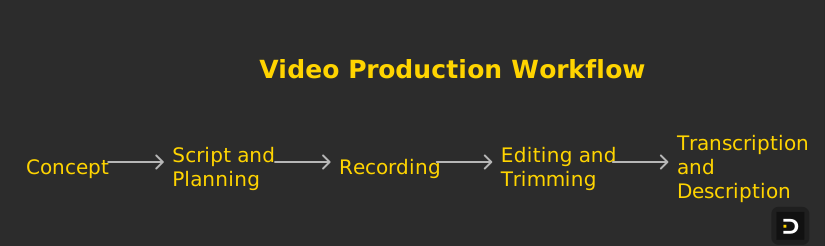
From concept to publication, your video production workflow should take 3–5 hours per video, including script development, recording, editing, and posting. If you're outsourcing editing, the timeline extends to 1–2 days.
Step 1: Script and Planning (30 minutes)
Write a loose script. Main hook (what's the surprising claim or question?), three key points or examples, close/call to action. Don't write word-for-word unless you're uncomfortable speaking off the cuff. Bullet points are fine.
Step 2: Recording (20–30 minutes)
Set up your phone on a tripod. Check lighting. Hit record. Shoot 3–5 takes (you'll delete 2–4 of them). For talking head, this is all you need. For screen share or whiteboard, set up your screen/whiteboard, then record. Most talking head takes are good on the second or third try—you're more relaxed and natural.
Step 3: Editing and Trimming (60–90 minutes)
Import your video into CapCut or Descript. Watch your takes, identify the best one. Trim any long pauses at the beginning or end. Add a simple title slide at the start (your name, the topic). Add captions—LinkedIn shows captions automatically, but most people watch video with sound off, so captions are critical for engagement. You can auto-generate captions in CapCut or use Descript, which transcribes automatically and generates captions you can easily copy/paste into LinkedIn.
Step 4: Transcription and Description (20 minutes)
Export your video with captions burned in (or use LinkedIn's caption feature). Write a short description for LinkedIn (2–3 sentences). Write a transcription of your video, either manually or by exporting from Descript. Post the transcript as a comment on the video—some people prefer to read, and transcripts also help with accessibility and SEO.
Step 5: Publishing and Engagement (15 minutes initial, then ongoing)
Publish the video directly to LinkedIn (don't link to YouTube—LinkedIn prioritizes native video). Include a strong headline that hooks people. Spend 15 minutes in the first hour engaging with comments—reply to early commenters, ask follow-up questions, encourage discussion.
Total time: 2.5–3.5 hours per video. If you're doing 2 videos per week, you're looking at 5–7 hours per week on video. Most founders batch-record: film 4 videos in one 90-minute session, then edit them over the next week. This feels much more manageable than producing one video at a time.
Building Your Video Content Calendar {#content-calendar}
A balanced video strategy mixes all five types. Here's a recommended cadence for a founder who's building a consistent video presence:
Per week: - 1–2 talking head videos (industry commentary, lessons learned, market observations) - 0–1 screen share or whiteboard explanation - Total: 1–2 videos per week
Per month: - 4–8 talking head videos - 1–2 behind-the-scenes or culture videos - 1 customer story or testimonial - 1–2 screen share/whiteboard explanations - 1–2 news reaction or timely commentary - Total: 8–15 videos
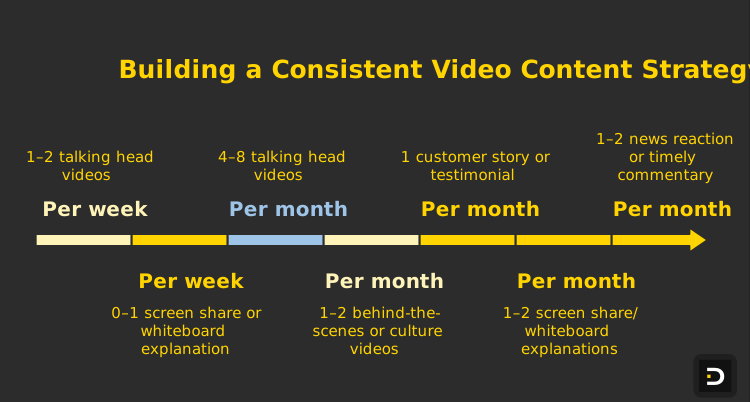
This mix prevents your feed from feeling like a monologue. You're mixing thought leadership, narrative/culture, customer proof, and timely commentary. This variety keeps your audience engaged.
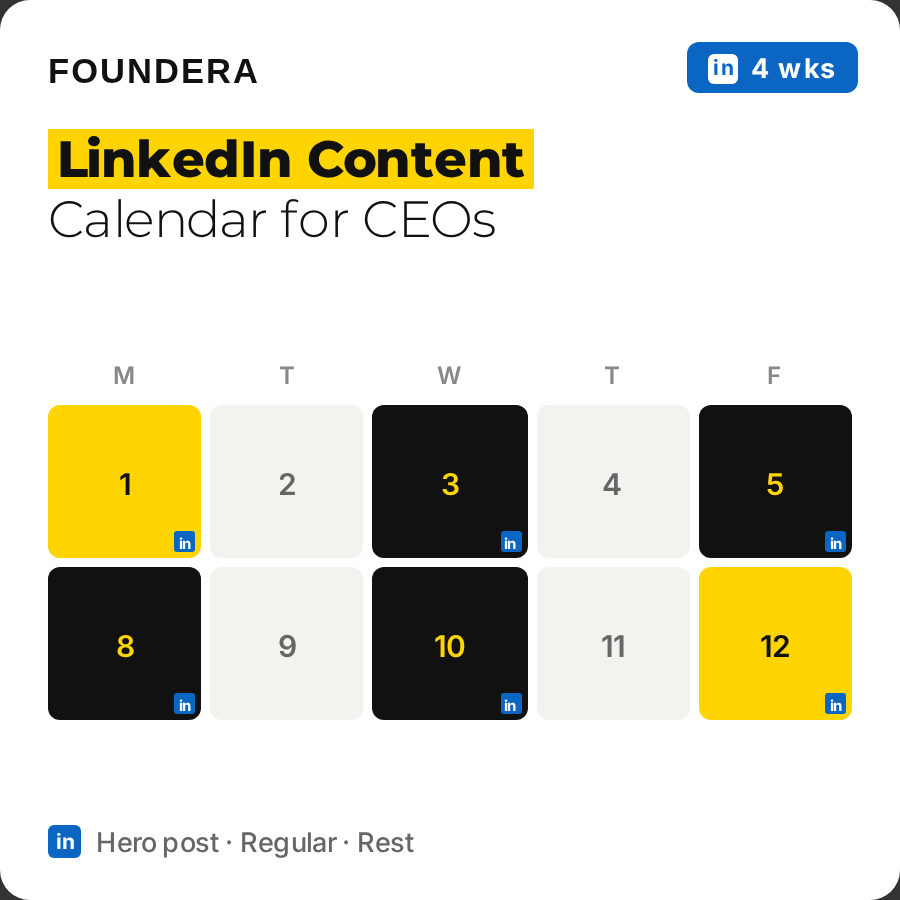
Sample 4-week calendar:
Week 1: - Monday: Talking head—"Why most Series A fundraising advice is wrong" - Thursday: Screen share—explaining your product architecture
Week 2: - Tuesday: Behind-the-scenes—day in the life at your company - Friday: Talking head—reaction to major news in your category
Week 3: - Monday: Customer story—customer testimonial video - Wednesday: Talking head—contrarian take on your industry - Friday: Whiteboard—explaining your market positioning
Week 4: - Tuesday: Talking head—founder's perspective on hiring - Thursday: Behind-the-scenes—team celebration or update
This creates rhythm and variety. Your audience knows to expect new content, and the mix keeps them interested.
Metrics That Matter: What to Track {#metrics-tracking}
Not all video metrics matter equally. Here's what to actually track:
Engagement rate (most important): Likes + comments + shares divided by views. Video engagement rates on LinkedIn typically range from 1–8% depending on how established your account is and how strong the content is. Track this over time. If your videos are consistently below 2%, you might need to adjust your content focus or format.
Click-through rate on CTAs: If you're using a CTA like "Drop a comment if you agree" or "Link in comments to X," track how many people actually engage with the CTA. This tells you how compelling your call-to-action is.
Inbound messages and opportunities: This is the real metric. Track how many conversations, leads, or opportunities come from video. Mention in your CRM or sales process "came from my LinkedIn video on [topic]." After a month or two of publishing video regularly, you'll start seeing patterns in what drives actual business results.
Watch time: LinkedIn shows you average watch time per video. Videos watched to 75%+ of completion are videos that resonated. If people are dropping off at 30 seconds, your hook isn't working.
Profile view increases: Publishing video regularly increases overall profile views. Track your weekly profile view count before and after you start publishing video consistently. You should see 20–50% increases.
Don't obsess over raw view counts—they're influenced by factors outside your control (algorithm changes, whether you publish during peak hours, etc.). Focus on engagement rate, watch time, and actual business impact.
Scaling: From One Video Per Month to Weekly {#scaling-video}
Most founders start by publishing one video every couple of weeks. The question is how to scale to 1–2 videos per week without this becoming a full-time job.
The answer is batching. Instead of recording one video at a time (which requires setup, breakdown, editing all separate times), record multiple videos in one session.
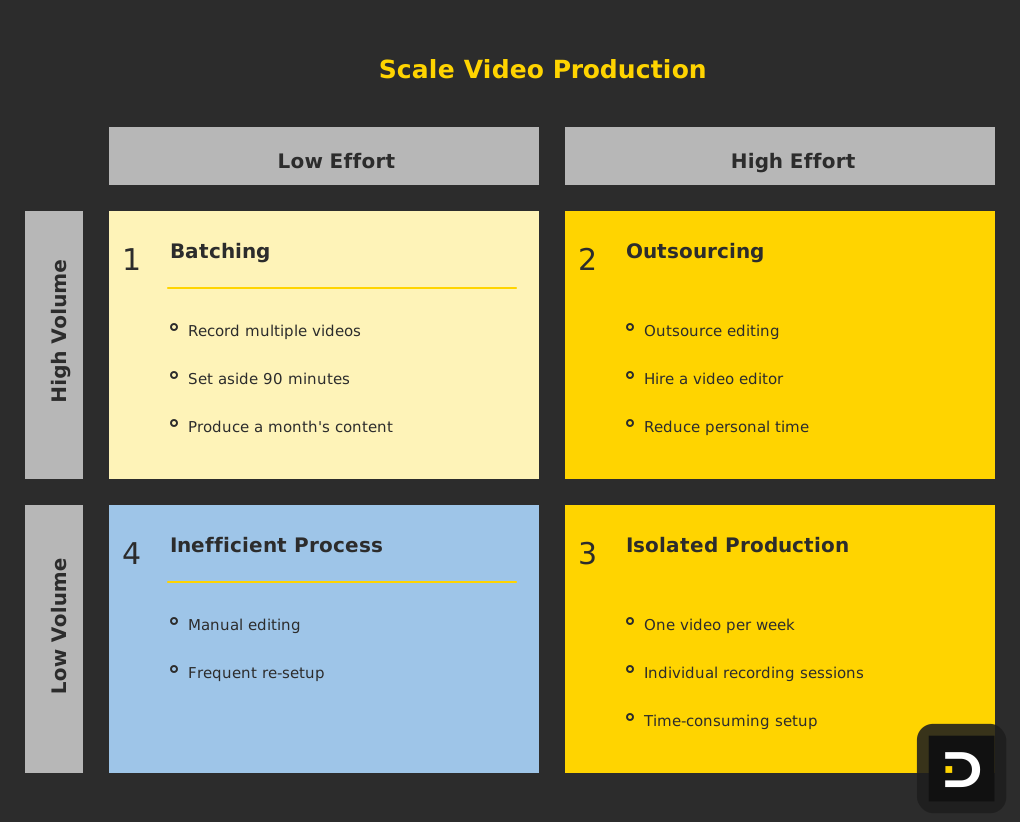
A batching session works like this: Set aside 90 minutes. Record 4–6 videos back-to-back. You're already set up, lit, and in the right mindset, so it's efficient. You might record four talking head videos in 45 minutes (30 seconds of intro, 90 seconds of content, 15 seconds of outro per take × 4). Then spend 30 minutes recording a screen share or whiteboard. Then 15 minutes on a behind-the-scenes walkthrough. In 90 minutes, you've got a month of video content.
Over the next week, you edit these videos 20–30 minutes at a time. By the time the first video publishes, you already have three more in the pipeline. This feels much more sustainable than producing one video every week in isolation.
Another scaling lever is delegation. You can outsource editing. A video editor (found on Upwork, Fiverr, or through a local film school) can take your raw footage and turn it into a polished, captioned video for $25–75 per video. This drops your per-video time commitment from 2.5 hours to 30 minutes (just recording and uploading). At 2 videos per week, outsourcing editing might cost $200–300/month, which is worth it if video is strategically important.
Frequently Asked Questions {#faq}
Do I need to look at the camera or at the script?
Some combination of both works. Looking at the camera makes videos feel more intimate and direct. Looking at notes occasionally looks natural. Most founders aim for 70% camera, 30% notes. Glance at your script every 10–15 seconds, but keep your eyes on camera for 10 seconds at a time. This looks natural and engaged.
What if I don't like how I look or sound on video?
Almost nobody likes their first take. Everyone hates their own voice on video—it's a known psychological quirk. After publishing 5–10 videos, you get used to it and it stops bothering you. The alternative is never publishing video, which means missing out on the engagement and opportunity benefits. Record the video. Publish it. Your audience cares about your ideas, not your hair.
Should I script everything or speak naturally?
A mix works best. Script key talking points so you hit them. Speak naturally within that structure. Full scripts feel stiff. No script feels rambling. Bullet points + natural delivery is the sweet spot.
Can I repurpose the same video across multiple platforms?
Yes, but optimize for each platform. LinkedIn prefers native video (uploaded directly, not linked to YouTube). TikTok and Instagram Reels want vertical video (9:16 aspect ratio). YouTube wants longer-form video (3–10 minutes). A single 60-second talking head works for LinkedIn and Instagram. A longer explanation might work better on YouTube. Don't just cross-post the same video everywhere—adapt it for each platform's format and audience expectations.
How long should founder videos actually be?
The best length is as long as it needs to be and no longer. A talking head commentary works at 60–90 seconds. A customer story might need 2–3 minutes. A product explanation might be 3–5 minutes. The rule: if you can make your point in 60 seconds, do it. Long videos need to be proportionately more valuable and entertaining to retain attention.
Ready to Build Your LinkedIn Thought Leadership?
Video is no longer a "nice to have" for founder content—it's essential. The engagement, the reach, the humanization, the opportunity generation all point in one direction: founders who publish video consistently win. The good news is that you don't need expensive equipment, professional filming, or a crew. You need an iPhone, a quiet room, natural light, and a willingness to hit record.
Start with talking head videos. They're the easiest to produce and they perform well. Record a simple 90-second take on something you believe strongly about in your industry. Publish it directly to LinkedIn. Engage with comments. Do it again next week. After a month, you'll have a pattern. After three months, you'll see the engagement and opportunity impact.
For a deeper dive on creator strategy and content planning, check out executive-linkedin-content-strategy-2026 or explore how video fits into a larger linkedin-content-strategy-b2b-lead-generation approach.
Ready to publish your first video? The hardest part is hitting record. Everything else is just showing up consistently.